Q) I have run optimise and I have unallocated orders. Why?
There are a number of reasons why an order/s would remain unallocated, below are the most common causes.
1. Incorrect fixed fleet setup.
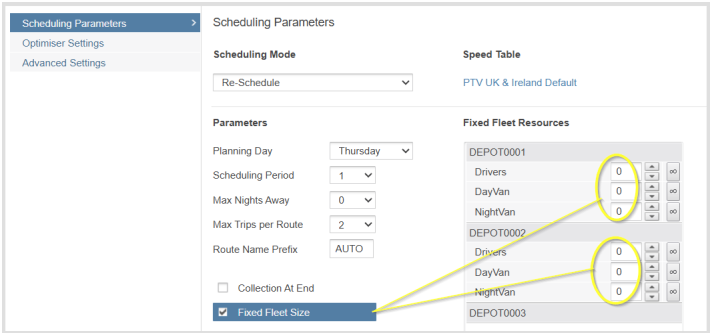
- Make sure that you don't set a fix fleet size of zero.
- If you've assigned vehicle access groups to your orders, make sure that fleet setup includes these vehicle types.
If you have AM and PM shifts assigned to different vehicle types, make sure that both types of vehicles are available in your fleet availability setup.
2. Scheduling for the incorrect day.
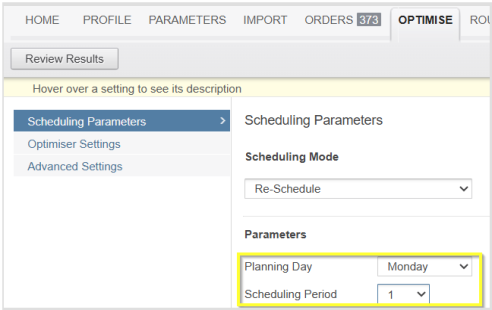
Make sure that your scheduling period encompasses the days that your order can be delivered/collected, for example, if your order is booked in for Tuesday then your scheduling period must include this day.
3. Worktime at the order is greater than the time window.
Depending on how the duration at the order has been configured, there is a possibility that this duration is longer than the open/close window, which can result in the order not allocating.
4. Vehicle size error.
If the vehicle capacity has been set too small or if your orders product quantities have been calculated incorrectly resulting in very large load units, then they will not fit onto the vehicle. Check that the order sizes and vehicle capacities will work with one another.
5. Vehicle not allowed overnights.
If your distant orders are not being allocated then either your vehicle is not allowed to do overnights or you've not set the number of allowed overnights correctly in your scheduling period. Check both.
6. Incorrect speed table active
In rare scenarios, if a user has copied a previous profile which was using a speed table for a different set of orders in a different area, this can result in orders not allocating, as the times and distances will be inaccurate. Either use the default map speed table or create a local speed table.
Q) I have set up 2 shifts. Why is only the first one being used?
If you've not assigned your shifts to individual vehicle types then the system will only use the first shift; you must assign your shifts to vehicle types even if these vehicle types are identical to others in their settings. The system will pick vehicle types when building routes and then ascertain the time from the shift attached to that vehicle type.
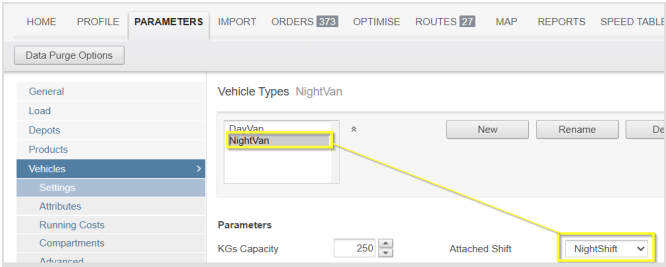
In the above example we have 2 vehicles with identical settings and we have assigned a different shift to each vehicle, this allows the optimiser to choose the best vehicle based on the available shift.
Q) How do I find out why orders are unallocated?
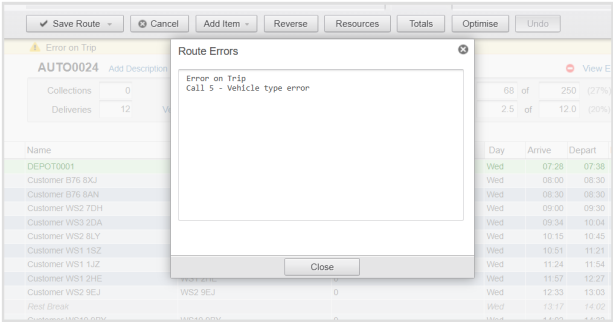
The simplest thing to do is manually add an unallocated order to a route with resources that you think could/should be feasible, the system will show route warnings and errors which should help highlight where the problem might be.
Q) Why am I getting a 16239 error when I run optimise?
This suggests that you have set a fixed fleet size of zero. Either use a free fleet or set your fixed fleet size greater than zero.
Q) Why do I keep getting logged out when I am using RO Cloud?
There are two possibilities
- 1. Someone else is logging into your account with the same login details elsewhere.
- 2. Your IP address is constantly changing in which case the system will detect this as a new login
Q) When I build a route manually RO is telling me that I need an off-duty when I know the driver can do all the work in one shift. What do I need to do?
- This means that you need to adjust one or more settings to make the route quicker. This is best done if you can compare actual timings, for example from tracking or POD. Consider the following options:
- You should increase the vehicle speed percentage for the vehicle type to make travel times quicker.
- If you're finding that your route is slower during certain periods of the day then you can change the road speeds for that period in the general tab.
- Reduce the time spent making a collection or delivery.
- Lengthen the times of the shift
Q) Why does my manually built route have off-duties when my vehicle is not allowed to have any?
- Routes that are created manually are evaluated by the system for time and distance which could mean that routes run into multiple days; you can also optimise individual multi day routes even if the vehicle is not allowed to operate such a run. The fact that the vehicle is not allowed on this route will be highlighted to you via a warning
Q) I have an optimised route and I think the sequence is wrong.
Two options
- Make sure that you've not set a minimum time and distance between calls as setting a higher value may mean the system calculates no advantage in re-sequencing orders.
- The time and distances being given to the system from the speed table are probably inappropriate for your orders: build a local speed table.
Q) Import is telling me that I have invalid product quantities.What is wrong?
This would suggest that you're importing product quantities with decimal places: decimals are not allowed in the import file. You will have to multiply up the number to remove the decimal and use the products tab within the system to divide the number so that you get your decimal value back.
Q) The import error file is telling me I have overlapping time windows. What does that mean?
- If you define two time windows then CLOSE1 time should not go past the time in OPEN2. See below example of an overlapping time window
OPEN1 CLOSE1 OPEN2 CLOSE2 0800 1300 1200 1700
Q) Why can’t I copy a profile or create a new one?
You've run out of storage, you will have to create space by deleting old projects or profiles.
Q) I have 2 customers at the same address. How do I get RO to apply the fixed time once or alternatively to see the orders as different customers and apply the fixed time accordingly?
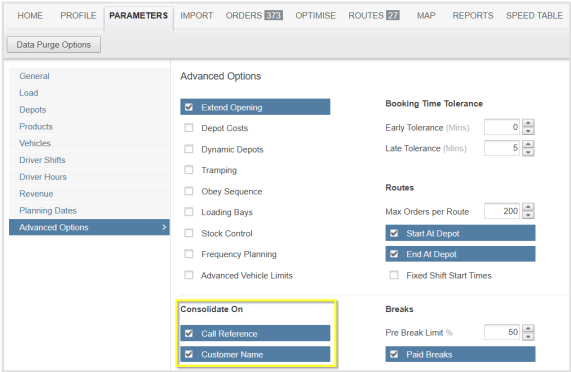
- If the customers at the same address have different customer names than you need to consolidate on customer name in the 'advanced parameters' to get the fixed time applied to both. If the names are the same the fixed time will only be applied once. If the customers have the same name but a different call reference and you wish for them to be seen as different orders then consolidate on 'call reference'.
Q) What do the coloured bars mean on the Route List?
One column shows the amount of work time and the other shows the vehicle fill. The colours change based on the below utilisation percentages
Q) How do I force a route to start at a particular time?
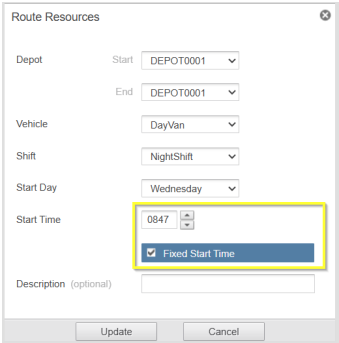
- You can give the route your own fixed start time by entering a start time and clicking the fixed start time box in the resources window. The route will then be evaluated from that time onwards.
Q) Optimisation is taking too long. How do I speed it up?
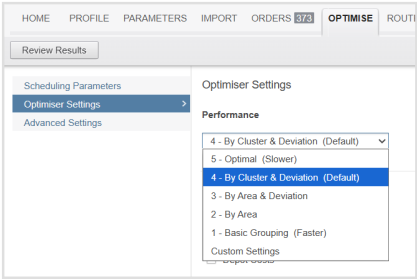
- We would suggest that you change the performance scale from the default (level 4) to level 2 or level 1. Please note that this will reduce the level of optimisation so you are likely to get a less efficient solution.
Q) I have imported some orders. There are no errors, so why have I got fewer orders in RO than I expect?
The most common reason is duplicate order references. If you have two orders with the same reference the system will import the first and overwrite it with the second order with the same reference resulting in only one order importing. Make sure all orders have a unique reference, up to a 12 characters maximum.
Q) I have product quantities in my import file so why is everything showing as zero in RO?
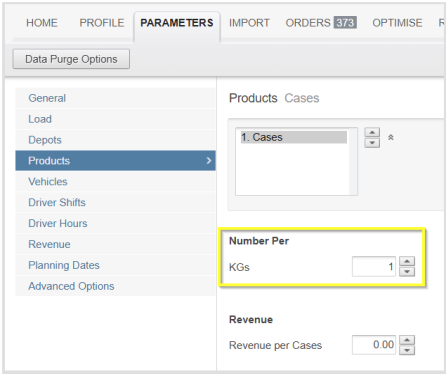
- Product columns from the import file need to bke converted to load units by linking them to products from within the parameters. You will need to create at least one product and show how that translates into a load unit by dividing the incoming value. If you want the same value from the import to show then set the divisor to 1 as shown below:
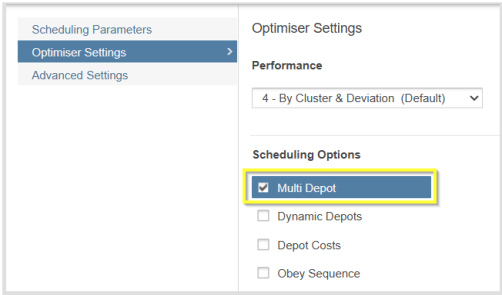
- I have more than one Depot in my profile, why is only the first one being used?
- Check to make sure that 'Multi Depot' has been switched on and ensure that there is a fleet from the other depots if you are running in fixed fleet mode.
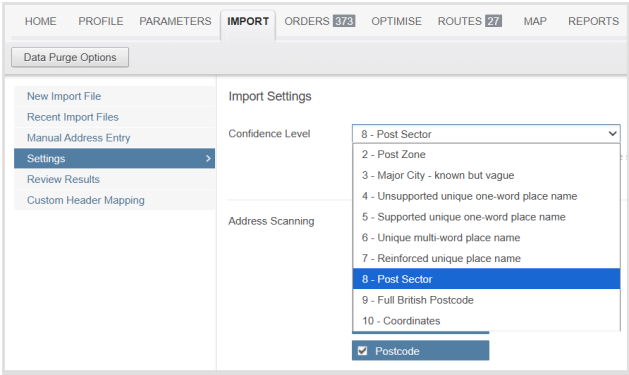
Q) My orders are not being located correctly, why?
- Check that you have your confidence level at a reasonably high setting, this will ensure that any low accuracy addresses will not import and will be highlighted.
Q) RO is telling me that I have run out space on my account, what can I do to fix this?
Make space by deleting old projects and profiles. If you wish to keep some of the results, then download the output report (CSV or the Full Profile Report) and then delete the profiles.
Q) I’m trying to recreate my existing routes but RO is leaving off some of the orders from the zones?
- When you run the system in 'Pre-Allocated' mode it attempts to put all the orders onto a route within the given parameters and scheduling period. Below are a few reasons why all the orders might not fit onto your given zone.
- Shift length too restrictive.
- Not enough working hours.
- Duration at each order too long.
- Order time windows too restrictive.
- Users given sequence is not achievable due to order time windows.
- Vehicle running on HGV speeds when user operates faster vehicles.
- Some of the orders on the zone have conflicting restrictions.
Q) Why can I only import 100 orders?
You are on a trial account. When you purchase a full account, this restriction will be lifted.
Q) My account says it will expire in a few days, do I need to worry?
If the account reports that it will expire then this message should not be ignored. It's worth checking that someone in your company has been in contact with us to see what the current situation with payment is.
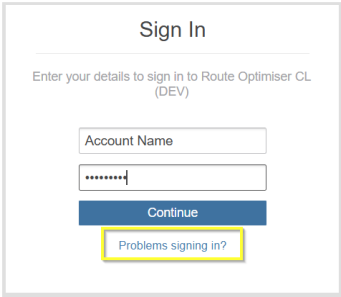
Q) How do I reset my password?
- Click on the below link and choose the appropriate option from the following screen.
Q) How do I spread work evenly across all of my Vehicles?
- By default the algorithm is designed to reduce the number of resources used by fully utilising the ones that give better optimisation. This behaviour may go against the concept of evenly spreading the work.
In order to mimic the desired result, you will either have to limit the number of orders per route in the advanced parameters or reduce the shift length. This might allow for work to be moved to other vehicles
Q) How do I stop certain vehicles serving a group of orders?
- You assign that vehicle an access group and then ban that vehicle access group on those orders.
- To assign an access group to a vehicle type:
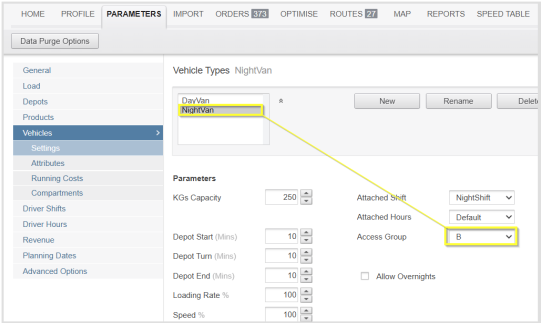
Use the 'BanVeh' column in your import file and list all the access groups that cannot service that order.
Q) According to Google Maps, the time and distance is longer/shorter than the time and distance in Route Optimiser?
- Our times and distances are taken from the global speed table which has been calculated based on HGV road speeds, the times can vary when compared to other systems. Although less likely, distances may also vary.
- To improve accuracy you can build a local speed table, which may help with the reported distance and speed up or slow down the vehicle types / road speeds to bring them in line with expectations.
- Before building a speed table, check the effect of varying the speeds, either of vehicles in the vehicles section of parameters or of different times of day in the general section of parameters.
Comments
0 comments
Please sign in to leave a comment.